
Panarch
Building Panarch: A USD Asset Browser in C++ and Qt
There’s a specific kind of friction that builds up quietly in a 3D pipeline. You have a library of USD assets and you want to find the right one. So you open your file manager, browse to the right folder, and stare at a list of filenames. You open usdview to check if it’s the right asset, wait for it to load, cloase it, open the next one. It’s not a catastrophic problem, just a slow annoyance that adds up over a day of work.
Panarch is my attempt to fix that. It’s a desktop asset browser build specifically for USD libraries. A grid of thumbnails with a metadata panel, filtering, sorting and one-click DCC launch. The kind of tool that should exist but doesn’t, at least not as a standalone open source application.
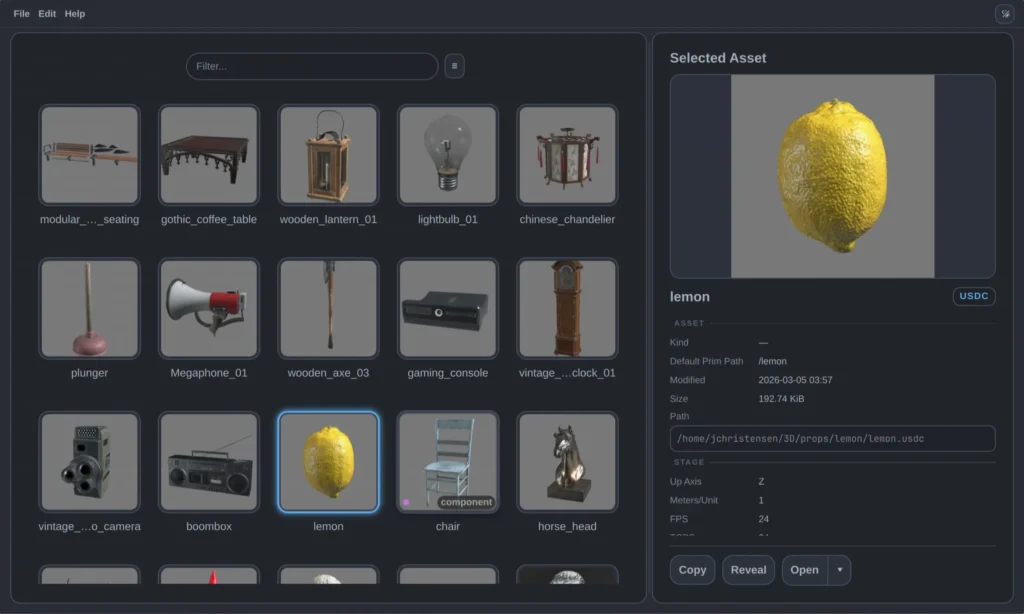
What is USD, briefly
USD (Universal Scene Description) is an open source file format and API originally developed by Pixar, now the closest thing the VFX industry has to a universal interchange format. It’s used in Houdini, Maya, Blender, Unreal, and most major DCC tools. If you’ve worked in a serious 3D pipeline in the last few years, you’ve probably touched it.
What makes USD interesting, and what makes building tools for it non-trivial, is that it’s not just a file format. It’s a composition system. A USD asset can reference other assets, stack layers on top of each other, define variant sets that let you swap between different versions of a model and defer loading heavy geometry behind payloads. Single .usd file might be a thin wrapper that pulls in a dozen other files to build the final composed scene. Understanding what a USD asset actually is requires opening it and asking the API, not justs reading a filename.
The architecture
Panarch is a Qt 6 application with a QML frontend and a C++ backend. The UI is written entirely in QML, which is Qt’s declarative UI language and is roughly analogous to what you’d do with React, except it talks directly to C++ objects exposed as context properties on the QML engine. The result is that the UI stays reactive and declarative while the heavy lifting happens in C++.
The most important architectual decision in the whole project is that the USD work doesn’t happen inside the main application process at all. Instead there are three separate binaries that the main app spawns as subprocesses:
scan_assets walks a library directory and builds a dependency graph of all the USD files it finds. It uses SdfLayer rather than UsdStage to do this. The distinction matters: UsdStage opens a file and runs USD’s full composition engine, resolving all references, applying variant selections, building the complete prim hierarchy. That’s expensive, and doing it for every file in a library would be slow. `SdfLayer` just reads the raw file format and exposes the prim specs and dependency paths without composing anything. For building a graph of which files reference which other files, that’s all you need and it’s dramatically faster.
Once the graph is build, scan_assets filters it down to entry-point assets, or files with a meaningful USD kind (assembly, group, component) on their default prim, or standalone files with no outbound dependencies. Files that are depended on by other assets in the library get filtered out because they’re implementation details, not things you’d browse for directly. The result comes back to the main app as JSON over stdout.
usd_inspector does the expensive thing, it opens a full UsdStage for a single selected asset and reads the composed metadata: upaxis, meters per unit, frames persecond, the full variant sets on the default prim, and all the composition arcs. This runs on demand when you click an asset, not during the initial scan. It also returns JSON over stdout.
thumbnail_generator uses UsdImagingGLEngine, USD’s built-in Hydra based renderer, to render the asset into an offscreen OpenGL framebuffer and save a JPEG. It runs as a subprocess because initializing Hydra inside the same process as the Qt UI caused conflicts. Running it separately also means a renderer crash or hang doesn’t take down the whole application. The main app runs up to ten thumbnail processes concurrently and queues the rest, so a large library populates its thumbnails in parallel without overwhelming the system.
The subprocess architecture means the main applicatino never touches USD directly. It launches processes, reads JSON, and updates the UI. That separation has been worth it. USD is a complex library with a lot of global state, and keeping it at arm’s length made the main application significantly simpler to reason about.
Some things that were harder than expected
The bounding box crash. USD provides UsdGeomBBoxCache for computing world-space bounding boxes, which `thumbnail_generator` needs to position the camera correctly regardless of an asset’s scale. It crashed with a SIGSEGV on destruction every time. The backtrace pointed at ~TfHashMap walking an invalid pointer, which is consistent with an ABI mismatch between USD’s internal memory layout and what the translation unit expected.
					UsdGeomBBoxCache bboxCache(UsdTimeCode::Default(), UsdGeomImageable::GetOrderedPurposeTokens());
GfBBox3d bbox = bboxCache.ComputeWorldBound(stage->GetDefaultPrim());
// destructor crashes here ↑
Likely a difference in compiler flags between the system USD package and my build. The fix was to skip UsdGeomBBoxCache entirely and compute the bounding box manually by iterating every UsdGeomMesh prim and transforming its points into world space. Less elegant, but it doesn’t crash.
					std::tuple<pxr::GfVec3d, pxr::GfVec3d> getBbox(pxr::UsdStageRefPtr stage) {
  double inf = std::numeric_limits<double>::infinity();
  pxr::GfVec3d bboxMin( inf, inf, inf);
  pxr::GfVec3d bboxMax(-inf, -inf, -inf);

  for (const pxr::UsdPrim& prim : stage->Traverse()) {
    pxr::UsdGeomMesh mesh(prim);
    if (!mesh) continue;

    pxr::VtArray<pxr::GfVec3f> points;
    mesh.GetPointsAttr().Get(&points, pxr::UsdTimeCode::Default());

    pxr::GfMatrix4d xform = pxr::UsdGeomXformable(prim).ComputeLocalToWorldTransform(pxr::UsdTimeCode::Default());

    for (const pxr::GfVec3f& pt : points) {
      pxr::GfVec3d worldPt = xform.Transform(pxr::GfVec3d(pt));
      bboxMin[0] = std::min(bboxMin[0], worldPt[0]);
      bboxMin[1] = std::min(bboxMin[1], worldPt[1]);
      bboxMin[2] = std::min(bboxMin[2], worldPt[2]);
      bboxMax[0] = std::max(bboxMax[0], worldPt[0]);
      bboxMax[1] = std::max(bboxMax[1], worldPt[1]);
      bboxMax[2] = std::max(bboxMax[2], worldPt[2]);
    }
  }

  return { bboxMin, bboxMax };
}
Scanning without opening. Every USD file in a library needs to be examined to build the dependency graph, but opening each one as a full `UsdStage` would be prohibitively slow. UsdStage::Open runs USD’s composition engine which resolves all references, applies variant selections and evaluates payloads, and that cost adds up fast across hundreds or thousands of files. For dependency scanning, none of that is needed. The dependency paths are sitting in the raw file data before any composition happens.
USD exposes that lower layer of the API through SdfLayer. Where UsdStage gives you a fully composed scene, SdfLayer gives you direect access to the file’s prim specs and declared dependency paths without doing any composition work. It’s more verbose to use, but for building a dependency graph it’s exactly the right tool. And, it’s cheap enough to run across an entire library without breaking a sweat.
					std::set<std::string> collectLayerDeps(std::string layerPath) {
  std::set<std::string> dependencies;
  auto layer = pxr::SdfLayer::FindOrOpen(layerPath);
  if (!layer) return dependencies;

  for (auto sub : layer->GetSubLayerPaths()) {
    auto res = resolveAgainstLayer(layer, sub);
    if (res) dependencies.insert(*res);
  }

  for (auto ref : layer->GetExternalReferences()) {
    auto res = resolveAgainstLayer(layer, ref);
    if (res) dependencies.insert(*res);
  }

  return dependencies;
}
Z-up vs Y-up. USD stages can be either Y-up or Z-up depending on what DCC created them. UsdImagingGLEngine assumes Y-up, so Z-up assets would render on their side. The fix is to detect the stage’s up axis via `UsdGeomGetStageUpAxis` and backe a -90° X rotation onto the default prim before rendering. It mutates the stage, which is fine since the thumbnail process owns it and exits immediately after.
Filtering out dependency files. The naive approach to building an asset browser is to show every USD file in the library. The problem is that a real library is full of USD files that are payloads or references pulled in by other assets, like geometry files, material libraries, or componenent variants, and none of those are things a user would browse for directly. Building the inbound reference graph and filtering based on it was the right call, but getting the filtering logic correct for edge cases (payloads that themselves contain references or components that are also referenced by assemblies) took more iterations than expected.
Porting from Python. Panarch originally had its USD scripting in Python, which is the path of least resistance since USD ships with Pyhon bindings. The problem is that distributing a Python dependent application is its own packaging nightmare on top of the USD packaging challenge. Rewriting everything in C++ using the native USD API removed that dependency entirely and will make distribution significantly cleaner. The C++ USD API is more verbose but not dramatically harder to use. It’s the same concepts, just with more explicit type handling.
The tech stack
- C++17 for the backend and all subprocess logic
- Qt 6 for the application framework, QML engine, and process management
- QML for the entire UI, the theme system, all compenents, and the main layout
- OpenUSD (monolithic build,
usd_m) for all USD parsing and rendering - CMake for the build system, with
justas a command runner for common tasks - Clang as the compiler
The UI has a custom theme system written as a QML singleton with full dark/light mode support. All spacing, typography, colors, and radii are defined as named properties on the Theme object and referenced throughout the component library: PButton, PMenuButton, PTooltip, PInfoRow, and so on. It’s a small component library but it’s consistnet.
What’s next
Panarch is in early alpha. The core pipeline works (scanning, inspection, thumbnail generation, filtering) but a few things are still missing or broken. Library root management needs a proper UI. The prim tree that usd_inspector builds isn’t displayed anywhere yet, which is the foundation of a scene browser tab. There’s a race condition in detail loading when you click assets quickly.
On the distributuion side, the plan is an AUR package for Arch Linux users first since that the lowest friction path, followed by an AppImage for portable Linux distribution, and eventually a Windows port. USD’s packaging story on Linux is fragmented enough that bundling it is probably the right long term call for broad compatibility.
The source is on GitHub under the GPL-3.0 license.
Panarch scratches a specific itch in a specific domain, which is exactly the kind of project I find most interesting to build. The problem is real, the technical constraints are non-trivial, and the result is something I actually use. That combination tends to produce better software than building things in the abstract, and it’s a more honest way to develop domain expertise. You have to understand USD well enough to use it correctly before you can build tools that use it well.
Additional Resources
- Code Repository: GitHub Link